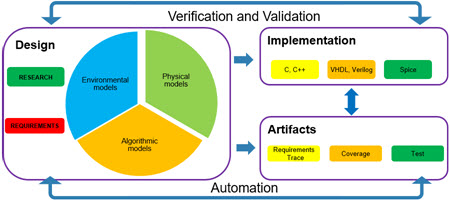
Why choose Model-Based Design?

Over the last 18 years, I’ve had a variation on this conversation on every project I have worked on. (Dramatized for a blog audience)

  • Talented Engineer (TE): This model based stuff is interesting and all, but I can write the same code in 1/2 the time and it is 10% more efficient.
  • Me (also a talented engineer): That is probably true, you write very good code. Do you enjoy writing code?

  • TE: Well no, I write code because that is what I need to do to implement my algorithm. But wait, you are admitting my code is better?
  • ME: Yes, yours is. How many other people in your group are as proficient in C? And if you don’t enjoy writing code, do you enjoy designing <MAGICAL SPACE WIDGETS>(1)?
  • TE: I Went to school so I could work on MSWs(2), I love working at MSW Co on them; and really, maybe one out of the 20 can program as well as I do.
  • ME: Ok, well, how much time do you spend coding versus designing? Debugging versus testing?
  • TE: Tell me more about MBD stuff…

Realizing the benefit

The definition of Model-Based Design that I use is simple:

The use of a model(3) that is the single source of truth to 
execute two or more tasks in the design cycle 

I work for The MathWorks, but, for a minute I will be agnostic. The definition simply says “a model.” The “model” can be a physical prototype, an analog computer, C code or, I hope, a Simulink or Simscape model. The important part is that the same model, without changes (4), is used at multiple points in the design cycle.

By my estimate I have drawn the V diagrams 1.3e5 times.(5)

If we think back to our TE in the opening section, what did they want to do? They wanted to design MSWs. They did not want to spend time creating test harness, writing test vectors, generating reports, and integrating with hardware. And why should they? TE was hired because he studied MSW and knows how to design the best MSWs; why take him away from that task? Since MBD allows users to use the same model at multiple points means that when our TE in design is done he can hand it off to another TE in the testing group who when they finish it can hand it off to a TE in integration who hands it off to a TE in release engineering. And why is this possible? Because it is much easier to find talented engineers who cover a given area very well (e.g. just test, or just release) than it is to find the magical unicorn(6) who can do all of the tasks well.

But wait! I can do all that in X

At some point down the line our TE comes back and says

  • TE: wait, just two paragraphs ago you said a Model could be C code, why should I use this graphical language?
  • ME: Wait! I just wrote that, so how did you see that? But OK, depending on your application, you may use Simulink, Stateflow or the MATLAB (textual) environment. The key is the infrastructure built up around the environment that enables the “more than one uses of the model.”

Can and should are two different beasts(7). Modern graphical modeling languages have supporting tools directly integrated into their environment. The set-up and integration is reasonably straightforward. Textual language, by their open nature, often have higher set-up and integration costs.

Making the transition / learning your way around

At first the transition to a graphical development environment (8) can seem daunting; Simulink’s base pallet has over 200 blocks(9), and knowing at first which one is the correct one to use can be confusing. However, like learning any other language you will quickly pick up the basics once you throw yourself in. Unlike learning a new programming language there are multiple transformation technologies you can apply directly to the model. When you start adopting Model-Based Design you should determine what “second task to execute” you want to adopt first. For more insights on this I would recommend viewing this roadmap.

Putting it all together

Ultimately the adoption of model based design isn’t about the tools, it is about the process. How you use each tool at each step along the way to the best effect. I welcome you to continue to join me in this space as upcoming blog posts delve more into Model-Based Design processes.

Ah the splash page image!

Model-Based Design for the VP/CTO

In past blogs I have written and talked about the Return On Investment (ROI) for adopting Model-Based Design. This link, from The MathWorks, provides another good overview on the ROI question. I want to propose another reason for this migration / adoption. Finding an engineer / scientist who knows how to develop “magical space widgets” takes time; on-boarding them them takes time. Losing them happens from frustration and boredom. This is one of the “hidden” drivers of ROI for MBD; when your people spend most of their time working on the things that interest them in ways that use their abilities and knowledge you have highly engaged employees which leads to greater innovation and higher quality.

Footnotes

  1. MAGICAL SPACE WIDGETS is a generic term for a customer project. Sometimes it is a car or a plane, or sometimes an actual spacecraft.
  2. MSW Is the agreed upon TLA for Magical Space Widgets.
  3. In the actual MBD workflow it will be multiple models, but let’s start simply
  4. Without changes is a simplification. The model you start off with at the start of the design cycle will be elaborated as it is developed. The important point is that if you took that elaborated model back to the earlier stages of the process it should still function in that stage (at a higher level)
  5. The version that I like best of the V diagram reflects the iterative nature of design, that within each stage there are iterations moving forward and back. Much like a PID controller, a good process is self correcting to errors in the process.
  6. Magical unicorns do exist, just don’t count on your process depending on them.
  7. Or in the image’s case, T-Rex
  8. OK, I’m not trying to be subtle here; once you start seeing them as development environments where you don’t throw away your work at each step along the way, the benefits become clear.
  9. Honestly I’m not sure how to count the number of “basic” functions in a textual language like C; while those 200+ blocks at first may seem like a lot, but once you realize they are targeted at the design of models you quickly pick them up.

This is “only” a test

In the last blog I introduced the best practices for designing scenario based tests. Today I am going to cover the, non Herculean(1), task of generating test vectors.

Good vector definitions have resolution down to the smallest time step

The “giddy” set-UP

Starting off happily let’s consider 3 things; the unit under test, the test harness and the analysis method.

  • Unit Under Test (UUT): The UUT is what you are testing. For the test to be valid, the unit must be fully encapsulated by the test harness. E.g. all inputs and outputs to the UUT come through the test harness.(2)
  • The test harness: (3)Provides the interface to the UUT, providing the inputs reading/logging the outputs. Test harnesses can be black, white or grey box. Test harnesses can be dynamic or static.(4)
  • Analysis method: Dynamic or static; how the results of the test execution are evaluated.

Not to put the cart before the horse but; we start with a test scenario. We need the test vectors. To have test vectors, we need a test harness. To have a test harness we need a well defined interface.(5)

Within the software testing domain (which includes MBD) a well defined interface means the following:

  • All the inputs and outputs of the system are known: Normally this is through a function interface (in C) or the root level inputs / outputs in a model
  • Type and timing are known: The execution rate (or trigger) for the UUT is known as are all of the data types and dimensions of the I/O.

Time to saddle up!

No more horsing around, once you have your interface designed, it is time to create your test harness. Given that we are working in the domain of Model-Based Design, the ideal objective is to automatically generate a test harness. (To all the neigh sayers out there)

A well defined interface!

Signal time!

There are four basic methods for creating signals

  • Manually: Ah…good old fashioned hand crafted test vectors. These take the most time but is where we normally start.
  • Automatically (general constraint): The next step up is to create test vectors using an auto generation tool. These tools generally allow for basic “types of tests” to be specified such as range, dead code, MCDC.
  • Automatically (constraints specified): The final approach is to use a test vector generation tool and apply constraints to the test vectors.
  • From device: Perhaps this is cheating, but a good percentage of input test vectors come from real world test data. They have all the pros and cons(6); noise and random data; they may not get what you are looking for but…

UUT and constraints

In this example we have the UUT and a “Test Assessment Block” as our method for imposing constraints. What we program into the Assessment Block is what we want to happen, not what we are checking against(7). For example, we could specify the input vectors for the WheelSpeed, WheelTqCmd and SlipRationDetected are at a given value and that the output vector is ABS_PWM . The automatic test vector generation would then create a set of tests that met that condition. You could then check for the cases where the ABS_Fault should be active.

COVID-19 Acceleration: issues with “from the device”

When you social distance from your co-workers you are, more often then not, social distancing from your physical hardware. This directly impacts the ability to gather “real world” test data. My prediction is that we will see 4 trends as a result.

  1. Greater use of existing real world data / public domain data sets: Lets be honest, there are times that data is gathered because it is easy to do so; go to the lab run the widget, collect the data and go. However there is, no doubt within your company and within government, and university data bases a wealth of existing data that will match what you need down to the 90% level
  2. Increased automation of test data collection: To some extent being in a lab or in a vehicle will always be required for collecting data, however many of the processes around setup, data collection and data transmission can be automated to reduce both the time on site and the frequency of the time on site.
  3. Improved physical models: I know what you are thinking, this is about collecting real world data! What sort of trick is this(8)! What I am suggesting is that collection of physical data will be prioritized for the creation of better physical models to reduce the net time in lab.
  4. In use collection: The next step will be the transmission of data from existing objects in the field back to the manufacture. The model “IC-2021” freezer in the field will, most likely, share 95% of the same hardware and software. This means you have a lab in the field.
The Lambert projection for more projects see

All of these methods will be used going forward to supplement traditional real-world data collection methods. With the physical modeling approach I am going to dive into how to select data to collect to rapidly improve the models. With the “in the field” we will look take our first look at big data methods.

Final thoughts

Test vectors are just one part of the overall testing infrastructure; the necessary starting point. We are going to keep looking at all the points along the Verification and Validation process; both in depth and at the impact that COVID conditions continue to have.

Footnotes

  1. With the use of one last Greek hero of antiquity, I hope to build a metaphor for the 12 labors of Hercules as applied to testing (with far fewer labors)
  2. We will look at how large the UUT should be in another blog post. For now, we will give the ballpark that a UUT should be linked to 5 ~ 8 related requirements. Each requirement will have multiple tests associated with it.
  3. A good test harness should be like the harness for a horse, e.g. provides a secure connection to the horse (software) enabling it to run fully, have the minimum number of attachment points (e.g. don’t overload with test points) and connect without chaffing (crashing or changing the behavior of the code).
  4. A dynamic test harness has the test validation software as part of the test harness, e.g. the UUT is evaluated as the test is run. A static test harness simply logs the data for post processing.
  5. Step 1 is to swallow a fly, today you will learn why!
  6. Noise is, and is not a problem. Since it will exist in the real world you should welcome noise into your test cases since that is what you will find once you deploy your product once and for all.
  7. As an example of what we want to happen, we may want to get an dessert (objective) but do not want one with coconut flavor (test).
  8. Not a very good trick, and 8! is 40,320.

Your Thread in the Labyrinth

I come to you now with white sails unfurled. For the last two years I have walked the twists and turns of the Model-Based Design labyrinth, working in depth with a single customer. All the while marking the walls with chalk and unfurling my ball of twine so that having slayed the minotaur of process(1) I could return to recount my deeds(2).

Two thirds of my way into the maze a shift occurred, one that happened for all of us; the onset of the COVID-19 virus. Like an earthquake, the effects of the virus had an impact on the “shape” of the maze. Some passages had small changes, some massive deadfalls. Being deep in the heart of the maze when it happened has given me insights into how Model-Based Design has, and needs, to shift in response. (Changes which I have found to be both of use now and of long term benefit to the development cycle)

To sail beyond the sunset

Two years ago when I set out on this odyssey(3), I had laid out a sea chart to guide people through the boundary waters of Model-Based Design. These two years have given me a chance to see both the Kraken and the Treasure in the depths of that sea. Two years ago I wrote an introductory post on scenario based testing; in which I laid out the rationale for the testing and a basic methodology for developing these tests; let us get go deeper.

The adventure starts now: the scenario

A scenario based test(5) should be described in two parts

  1. What happens: (description) e.g. what are the steps that take you from point A to point B.
  2. What cannot happen: (prescribed) As you go from point A to point B what if C happens then your test fails.

A,B,C, simple as 1,2,3 right? Well yes, if it ever was just A,B and not C.

The high C’s

Lets continue thinking about a state machine where our objective is to get from State A to B. For many years I my observation has been that the average number of state transitions to get between to “states of interest” ranges between 6 to 8. If each state visited along the way has 2 exit points and if there are multiple ways to get from A to B then the total number of described transitions is on the order of 6 to 8 and each transition can have multiple required conditions.

The seven deadly sins(6,8)

Ok, not really 7 but…

  1. What is proscribed can change: The allowed behavior or event often changes between your current states(7). Often the proscribed value of a variable in your starting state is what you need to make a later transition.
    • The mistake: Setting a test to monitor “if variable X = 1” you fail
      • Recommendation: Evaluate the scope of each proscribed behavior and assign to only the active state. (Note this has the side benefit of faster running tests!)
  2. Synchronicity of event: A common conditional logic that you will encounter is “(input1 == 1) && (input2==0)”. On the surface this seems reasonable; but what if input 1 and input 2 are discreet events and only occur for one time step?
    • The mistake: The test is written in such a way that you have input1 and input2 hitting the correct value at the same time, but often in the “real world” there is some “jitter” in the signals.
      • Recommendation: If you have signal that have “jitter” consider having a temporary buffer variable that hold the value for a set number of cycles.
    • Note from the “labyrinth”: these sort of “bugs” take a long time to track down since the “test” passed but the actual device failed.
      • Recommendation: For all event based inputs add a notation to the Interface Control Document (ICD). This should be used as part of the test structure to determine if you have accounted for jitter.
  3. Not an exact match: For floating point numbers the scenario detection needs to use “fuzzy logic”. E.g. if the scenario calls for the vehicle to accelerate to 88 kph then the test should be read “when VehSpeed >= 88 && VehSpeed <= 88 + delta”. E.g. give some “wiggle room” in the event.
    1. The mistake: This is a common violation, so much so that we have MISRA 13.3 to cover it.
      • Recommendations: write “check checkers” to check your checks to validate they are valid(9)
    2. Notes from the “Labyrinth”: Surprising to me this error has been more common in test infrastructure than in the units under test. From what I have seen this is a function of not running the same analysis tests on the test code as on the production code. Remember, it dose not matter where the bug comes in)
  4. Not all routes are the same: This is an issue of under specified use cases; in the one case we can think of the difference of getting from the ground floor to the top floor of a 10 story building; option 1 take the stairs, option 2 take an elevator; both gets you there but one is better for your heart.
    • The mistake: When there are multiple routes a “shake up” of the multiple route can occur where parts of one route are melded onto another
      • Recommendation: For multi-route systems create one test case for each route.
    • Notes from the “Labyrinth”: The existence of multiple routes is, often, not taken into account in the design specification. The multiple routes are found when analysis tools (Such as Simulink Design Verifier) are used.

Next Steps

Having covered the specification portion of the test case in the next blog post we will cover the best practices for generating the test vectors while reducing the human input. In this section we will cover how to do this and why they are different when working in the post COVID-19 world.

Footnotes

  1. It is the minotaur of process since process is about the journey between two, or more, states. Having successfully navigate the maze once future trips through are no longer mysteries.
  2. In reality I will be recounting both the deeds of my own work and the many wonderful people I have been working with over the past 2 years.
  3. If learning about Model-Based Design can be thought of as a hero’s journey then let me be your wise elderly mentor(4)
  4. Except, please, I don’t want to be the mentor who is killed off in the 4th act
  5. Scenario based tests can be derived from use cases.
  6. Branching out from Greek myths to medieval concepts.
  7. Living in California now I think complaining about the weather should be proscribe behavior. Even after two years we can’t get over how wonderful it is year round.
  8. Ok, to many bullet points may be one of the “new” deadly sins
  9. When I worked on the original version of the Model Advisor for The MathWorks we had more discussion about “what is a check (guideline) versus check (test function)” then I can possibly remember.

Best practices for model cleanup

In this blog I have written a lot about “mushroom” and “spaghetti” code; today I’m going to write about the best practices for updating and cleaning up those models

Should I update?

Before you start you should ask yourself three questions

  1. Beyond cleanup are there additional modifications needed to the model? (No)
  2. Is the model, as written, performing it’s intended function? (Yes)
  3. Do I have tests cases that cover the full range of behavior of the model? (Yes)

If you answered as indicated (no,yes,yes) then stop. Spend time on another part of your code that does not meet those criteria(1). Otherwise lets start…

Baselining the model

The first step in cleaning up code is baselining the model. This activity consists of N steps

  1. Back up the model’s current state: Ideally this is already handled by your version control software but….
  2. Generate baseline test vectors: To the degree possible create baseline tests, these could be auto-generated.
  3. Generate baseline metrics: Generate the baseline metrics for the model, ram / rom usage, execution time, model coverage…
  4. Create the “Difference Harness”: The difference harness compares the original model to the update model by passing in the initial test vectors and comparing the outputs.

What is different about today?

The next question to ask in your refactoring is “do I re-factor or do I redo”? Depending on the state of the model there are times when simply re-doing the model from scratch is the better choice. This is often the case when the model was created before requirements existed and, as a result, does not meet them; that would make for a very short article though so let us assume that you are refactoring. First figure out what needs and what should change. To do that ask the following questions.

  • Review the requirements: what parts of the requirements are met, which are incorrect and which are missing?
    • Prioritize missing and incorrect requirements
  • Is it possible to decompose the model into sub-components: In most cases, the answer is no, or yes but it is tangled. It wouldn’t be mushroom code if you could.
    • Create partitioning to enable step-based modifications
  • Identify global data and complex routing: Minimization of global data should be an objective of update, complex routing is an indication that the model is not “conceptually” well decomposed
    • Move sections of the model to minimize signal routing and use of global data
  • Identify the “problem” portions of the model: Which sections of the model most frequently has bugs?
    • Squash them.

Once you have asked these questions you understand your priorities in updating the model

Begin modification

First understand the intent of the section of the model, either through inspection or through review of the requirements . Once you understand what the intention is you can start to simplify and clarify.

  • Simplifying logical statements / state charts
    • Run tool such as Simulink Design Verifier to check for dead branches, trim or fix
    • Look for redundant logical checks (multiple transitions all using the same “root” condition check)
    • Look for redundant states (multiple states exist all with the same entry and exit conditions)
  • Mathematical equations
    • Did they create blocks to replicate built in blocks? (Tables, sine, transfer functions)
      • Replace them with built-in blocks
    • Are complex equations being modeled as Simulink blocks?
      • Replace them with a MATLAB function
  • Size (to big or to small)
  • Partitioning rationale

Footnotes

  1. With mushroom code it is highly unlikely that you have tests cases that cover the full range of behavior of the model; model (or code) coverage should not be confused with full behavioral coverage since it is possible to auto-generate tests cases that would cover the full model without every understanding what that coverage means
  2. One advantage of having this blog for 3+ years is I can mine back article for information. Hopefully you will as well. What I mine is yours, nuggets of MBD wisdom.

Interface control documents and data dictionaries

Interface control documents (ICD) and data dictionaries are two parts of a mature MBD infrastructure. The question I often hear is “what is the boundary between the two artifacts”? First a high-level refresher:

  • The Data Dictionary: an artifact used to share a set of common data definitions external to the model and codebase.
    • Objective: provide common and consistent data definition between developers
  • The ICD: an artifact used to share interface information between components external to the model and codebase; often derived from or part of the requirements document set.
    • Objective: provide a common interface definition to simplify the integration of components when multiple people are working on a project.

An example of an ICD spec is

function namemyIncredibleFunction
function prototype(double mintGum, single *thought, something *else)
Call rateevent-driven
Multi-thread interruptibleyes
Function information
VariableTypeDimensionpassby
mintGumdouble1value
thoughtsingle4reference
somethingstructure10reference
function specification

And here is where the boundary question comes up. In specifying the data type and dimension in the ICD I am duplicating information that exists in the data dictionary; violating the single source of truth objective.

Duplication can be dangerous

So what is the flow of information here? I would suggest something like this…

  • The ICD document is created as part of the initial requirement specifications
  • The data interface request is used to inform the initial creation of data in the data dictionary
  • Once created the data is owned by the data dictionary

Infrastructure: making your artifacts work for you

Data dictionaries serve an obvious purpose, they are a repository for your data. On the other hand, interface control documents can seem like a burdensome overhead; which it will be without proper supporting infrastructure. If you remember the objective of the ICD, to simplify integration, then the need for tool support becomes obvious. When a developer checks in a new component it should be

  • Checked against its own ICD
  • Checked against the ICD for functions it calls and is called by
  • Its ICD should be checked against the data dictionary to validate the interface definition

With those three checks in place, early detection of invalid interfaces will be detected and integration issues can easily be avoided.

ICDs and the MATLAB / Simulink environment

Recently MathWorks released the System Composer tool. While I have not had a chance to try it out yet it offers some of the functionality desired above. I would be interested to learn of anyone’s experience with the tool

Demos: Are you making college chili?

When I was in college I would, after swim meets (H2Okies) make up a batch of chili. It had all the right ingredients (1) and got the job done(2) but it was tuned for a very narrow audience. It wasn’t until I started cooking for and with my wife Deborah that I really learned what it means to create a meal (3) for a wide group of people (4).

Michaels Chili Recipe (College and Adult version)

College (Demo)Adult (Production)
Ingredients
1-lb ground beef
32-ounces canned kidney beens
32-ounces canned tomatoes
1 onion
garlic powder
pepper
salt
red pepper (a lot of it)
cayenne pepper (a lot of it)(5)
Brown sugar (2 tbl)

Preparation:
Brown ground beef in pot,
“cook” diced onions in beef fat
Throw in the rest, cover with water.
Stir it every once in a while.
Add water to keep from scalding
Ingredients
1-lb ground beef 96% fat
1-lb dry kidney beans, sorted and soaked
16-ounces canned tomatoes
3 ~ 4 fresh tomatoes
4 ounces tomato paste
1 onion (red)
4 stalks celery
Spices: To taste and freshness
fresh garlic, pepper, salt, paprika, cumin

Preparation:
Saute onions, garlic and celery in olive oil
Brown beef with onions and garlic and celery
drain excess fat
On low heat add fresh diced tomatoes let sweat for 5 minutes
Add in spices
Add in kidney beans and canned tomatoes
Add water to cover beans
Simmer at low heat for 2 hours
An underspecified recipe

Demo versus production: What is the difference?

There are three things, first the dish is no longer dominated by single note, heat(6). Second, time, the college recipe was great for someone who needed something fast, e.g. throw it in and walk away; the adult version requires an investment for a greater return. Finally, reliability; hidden in the simple phrase “spice: to taste and freshness” is a decade of lessons learned.

Should you (I) make a demo? Or a prototype?

When these winter months roll around and the desire for a good hearty soup rolls around I can generalize my knowledge to a new soup. I don’t need to demo because I learned from past experiences. When I am creating a new software item I first look to see is there something I can reuse (or this), is it a known domain. If there is I don’t create a demo. If I need to learn something or I need to prove to a group that it can be done then I create a demo.

If the “demo” is something that I think I will be able use in the future then it becomes a “prototype”. If I am prototyping I put more time into the demos architecture, creation of test cases, creation of supporting infrastructure. It may not be the final product but it will be drawn upon.

The false lessons of demos

One last comment on demos; they can teach you false lessons. When you are doing things “fast and dirty” you have problems that you do not have when you follow a mature processes. When I was in college my chili was in constant state “it could burn”; it could burn because I was using a bad pot and a cheep stove with poor heat control; I havn’t burned a chili in 20+ years.

The same issues can happen with software development. When you are in rapid prototyping mode it is easy to have spaghetti code(7). This should be viewed as an failure of the development process, not of software in general.

Footnotes:

  1. It’s hard to mess up beans, but, in all honesty the ground beef could have been of higher quality
  2. The job, in this case being twofold; first feeding very hungry college age athletes and second burning the roof of your mouth out.
  3. In college the meal was chili and corn bread; byob. I know I made salads but I don’t think I ever served one.
  4. Of course when it is just Deborah and me then the meal is perfectly tuned to us; which is another sort of perfected meal.
  5. It is a good thing that I did not know about ghost peppers back then, I would have used them, I would have used way to many of them
  6. Heat in chili is, now, an after market feature. If you want it hot you can add many different condiments to add heat. I would recommend this compote.
  7. Mushroom code and spaghetti code are similar that they develop due to a lack of planning. Spaghetti code is characterized with convoluted calling structures; mushroom code is accumulation of code on top of code.

If a tree falls… or the importance of documenting processes

There is an old engineering joke(1);

One day, a year after she(3) retires Lucy receives a call from her former boss. “Lucy, the X-43q isn’t working, I know it was your baby, um, could you come in take a look at it?” Grumbling she says “Yes, but I want 10K for the repair”; since the X-43q is key to everything they due and no-one knew what to do(2) they quickly agree. The next day she comes in, listens to the machine for 5 seconds and says “The timing belt is slack, replace the tensioner spring. Check please.”

In shock her former boss sputters, “You can’t expect 10K for 5 seconds of work!”

She replies, “The 10K isn’t for the 5 seconds of work, it is for the 10 years that where I learned what to do”(4)

Attributed to just about every senior engineer….

So to explain the title: If a tree falls in the forest it still makes a sound; however if a process isn’t written down it does exist. So what how do you write up a process?

Objectives, actions, triggers, conditions and rationale

The most basic process document has three parts

  1. Objective(s): the outcome of following the process
    • Positive: X shall occur
    • Negative: X shall not occur
  2. Actions: what you do to achieve the objective
    • Explicate: The following steps shall occur
    • Engineering judgement: (5) The following types of things shall be done
  3. Rationale: why you are taking an action, condition, or modification. There can be multiple rationale for a single process. More complex processes will have more rationale

It is rare for a process document to have just the Objective and the Actions, the two other categories are

  1. Triggers: what starts the process in motion
    • Periodic: tasks that are performed on a temporal basis
    • Conditional Event: when X happens the the task starts
    • Process Event: when a milestone in the project is reached
  2. Conditions: modifications to the process based on environmental factors
    1. Modifying: if Q happens then follow the “Q” path through the process
    2. Aborting: if R happens then halt the process and start process “Oh crud R happened”
    3. Gating: Before this process can start the following must happen.

The distinction between conditional and process events is simple; process events are expected, conditional events may happen(6).

A short example process

Process for making 3-bean soup (objective: have a tasty meal)

When the number of soups in the freezer falls under 3 (conditional trigger) then a soup shall be made. The type of soup shall be dependent on the last 2 types made (modifying condition) to prevent repetition of the soups (rationale)

Actions:

  1. Verify you have 2 hours to monitor the soup (gating condition on the process)
  2. Verify you have the required ingredients (gating condition on the process)
  3. Chop, dice, mince and mix,
    do the things for soup to fix.(7)
  4. O-going: Monitor for soup overheating
    1. Add water or reduce heat (engineering cooks judgement)

With step 4 I introduce the notation “on-going”. With in a process some steps are one-off and others are on-going or repeated. In context it should be obvious why something falls into a given category

Footnotes

  1. Like most, it isn’t funny, it is bitter. Engineering jokes are like Aesop’s fables, they attempt to impart wisdom but we are often left wondering “if the mice have metal working technology to make a bell, why don’t they make some arms and weapons”(2)
  2. At least that is what I wondered.
  3. I’ve updated the old joke
  4. Of course if they had given her time to write up what to do she could have stayed retired
  5. There will always be some engineering judgement in processes, the goal is to guide that judgement
  6. We can use a simple cooking analogy. When you are making dinner you expect the food to finish cooking, that is a process trigger, e.g. set the table. You do not expect the food to catch on fire in the oven, that is a conditional trigger.
    1. One day I will start a blog “MBC : Michael Burke Cooks” for now accept a short rhyming couplet for what goes into making a soup (or anything else)

Software developers: review like a cooks, not accountants…

In this post I argue for performing simulation instead of model differencing to examine changes to a model. So take a deep breath(0) as I’m about to push this analogy fairly hard… When I’m in the kitchen creating a meal I take care with my ingredients, checking for freshness and the flavor balance (1), always aware of allergy issues(2). I start in a clean kitchen(3), I use a sharp knife and a cast iron pan on a gas stove, quality tools(4). When the dish is done I plate it and I judge it by how it looks and how it tastes. When it is done it is judged by what it is, not what went into it.

I have no idea what this is but…

By contrast when I balance my checkbook(5,6) in each line item is inspected for correctness and the desirability of the transaction; to understand my finances I need to know each transaction.

A deluxe version

A good model is rather like bouillabaisse(9), a complex harmony where the sum is greater than the parts; so then how do you “taste” a model? If you are working in a Model-Based Design environment(10) it means simulating the model and inspecting the outputs of the simulation. If the simulation shows the model is behaving in the expected way for a given scenario, then you know you have the “right” taste. This is a functional review.

“But wait”, you may be saying(11), “what about allergies, a clean kitchen and good tools”? These are addressed by processes and guidelines. Processes protect you from allergies by enforcing guidelines (12), test driven development (13) and development based on requirements (15). The clean kitchen, well that comes from following good processes for an extended period of time; and like any good chief would tell you, “if you are not cooking you should be cleaning”. Good tools, well, see The MathWorks.

Me with slightly darker hair

“Ok, so I see why be a cook, but why not an accountant? Don’t I need to double check things?” You may be pondering (16). Accounting comes into play if you don’t pass the taste test and if those tests don’t identify the root of the problem. Then performing a block-by-block (or line-by-line) review of model is realvant. Until then doing a model or code differencing does not provide utility.

If I have an equation, say 2+2, and then you change it to 2+3, it is easy for me to see the difference in the outcome by comparing the text. However if this is my equation

The Navier-Stokes in 3-D

The effect of a small change is not obvious by inspection. Differencing text and differencing models is a methodology held over from a time before easy simulation when it was one of the few ways to figure out what was happening. This accounting approach is still valuable as a debugging tool but it is not and should not be your primary method for reviewing models.

Disclaimer: this maybe the first post where the footnotes are longer than the article. I got carried away. I blame Terry Pratchett (17).

Footnotes

This is where I show just how much I can push this analogy:

  1. Deep breath: Note if you were in the kitchen while I was cooking that deep breath would be delightful, unless I’m pickling, pickles taste great but brine air is not fine air.
  2. Freshness & flavor balance: In software this I validate “am I using the most up-to-date methodologies” and are those methodologies the correct for this project.
  3. Allergies: Are a stand in for the know issues in development, either bugs or requirements that need to be met.
  4. A clean kitchen: clearly this is a plea to start your development process with a minimum of legacy issues.
  5. Quality tools: There is an old cooking saying “The sharper the knife the safer the knife”. Quality tools prevent some category of errors and make it easier to prevent others.
  6. Checkbooks: For those under the age of 25, checkbooks are a primitive form of tracking payments in which the writer of a check recorded the amount of the promissory note (check) and subtract that from a banking balance.(7)
  7. Checkbooks 2: Technically speaking out online spreadsheet that collates information for statistical analysis.
  8. Checks/Balance: This is not to be confused with the concepts of checks and balances that is baked into the US constitution.
  9. Bouillabaisse: With the hint of Safron that pulls it together.
  10. MBD Environment: If you are not already working in this environment, hopefully this blog gives you reasons to do so.
  11. May be saying: I am assuming you are very invested in this blog post and can’t help but verbally exclaim your concerns as you read it. Please be aware of the people around you.
  12. Guidelines: Modeling guidelines are like cooking best practices; codified common knowledge.
  13. Test driven development: In the same way you press on a burger to know when it is done (14) test driven development makes sure your code is well-done.
  14. Press down on the burger: This would be considered black box testing since you are not cutting into the burger.
  15. Requirements: Requirements are like recipes; they are what you start with and you may have to evolve over time. Rational evolution leads to tasty dishes, random substitution leads to the garbage disposal.
  16. Pondering: Doing this after 11, and noticing the people around you.
  17. Terry Pratchett (Sir): https://en.wikipedia.org/wiki/Once_More*_with_Footnotes

Simulink: What is an Algebraic Loop?

If you have worked with Simulink for more than a few hours you have no doubt seen the error message “Warning world about to end, Algebraic loop detected. You have 10 seconds to snip (insert unit delay) to prevent model from exploding

Ok, so I exaggerated the error message, however why there are algebraic loops in the system is often a source of confusion for people. If we look at the model above and “translate it” to into the mathmatical equation we have

 y = y - 0.5 * y

This equation, written in C is perfectly legal; however there is a hidden assumption of the initial value of Y. Let’s look at how Simulink would like you to set this up and then look at what that does depending on how you break the algebraic loop.

We have three examples of breaking the algebraic loop. For the sake of argument let’s say that the input is a constant value of 1 and let us change it to a sum operation

Form 1Form 2Form 3
T = 01.521
T = 11.7521.5
T = 21.98321.875
T=inf222

If the IC value for the unit delay is switched to 0 (zero) then form 1 and 2 result in the same outputs, with output values of 1, then 1.5 while form 3 has an initial output of 1, then 1, then 1.5.

Recommendations

General best practice is to insert the unit delay block where the data is consumed, in this example it would be placed before the “Sum” block. By doing this we ensure that only the paths that need the last pass data receive last past data. Form “3” in the example shows the effect of inserting the unit delay at the source.

A sample project: Model Unit Validation

With this post I’m going to walk through a sample project demonstrating how Units in Simulink Models can be validated. Demonstrating each stage of the project development, providing insight into how and what I was thinking at each step along the way.

Stages of project development

There are 5 stages to project development

  1. Identification of need: What is the problem you are trying to solve?
  2. Review of existing solutions: Is there an existing solution that meets needs?
  3. Task identification/estimation: What are the tasks / steps that need to be completed and what is the effort (risk) to complete them?
  4. Implementation and testing: Following a ‘test as you go’ strategy develop the modules that you need
  5. Validation of solution: Does what you did in 4 solve what you needed in 1?

Stage 1: Identification of need

As of release 2019A Simulink provides

  • Unit specification at the boundaries and through Simulink.Signal and Simulink.Parameter objects
  • Unit checking at the boundaries of models (inports and outports)

While this is very useful (and you should always define your boundary conditions) for large models knowing what the units of interior signals would be beneficial.

Problem to be solved: determine the unit of all blocks internal to the model and use that information to validate the units at the boundaries / internal to the model.
†

Unit checking at the Subsystem Boundary

What I wanted to be able to do was specify the unit types on the inports and outports and propagate the units through the model.

At this stage, depending on the complexity of the project, the high level requirements should be written; derived requirements will be written at the start of task 3.

Stage 2: Review of existing solutions

There are two classes of “existing solutions”. The first are solutions to “base” problem you are trying to solve; the second are solutions to the sub-tasks in the problem. In this instance we have already identified the extent of the solution to the “base” problem, the ability to check units at the boundaries of the model; for what we want this is insufficient.

Examples of “Sub-Tasks”

For the sub-tasks the Simulink API’s provide the interface required to “decode” the model to propagate the information through the model.

Stage 3: Task identification/estimation

Depending on the size of the project task identification can be decomposed to a “function” based level or lower. For large projects the “function” may in fact be a collection of functions. As you start to identify the functions required reuse of the components should be taken into account. My first pass (almost always on paper) is in a “operation required / issues” format.

  1. Propagate unit information in the model:
    1. How to determine data/unit flow
    2. How to handle data merging blocks (buses and mux blocks)
    3. How to handle subsystems
  2. Calculate output units based on inputs:
    1. Define categories of block transformations
      • Matching
      • Canceling
      • Integration / derivative
      • Null
    2. Handle effects of Parameter data types
  3. Apply information to the blocks
    1. Units (note most blocks don’t have a “unit” field
    2. Status of block (assigned, unsigned, invalid)
  4. Check calculated units against assigned
    1. Outports
    2. Simulink Signal objects

Having identified the tasks I now think about what goes into each step and if I have experience or near experience in coding it; in this case all of the tasks involved are close to things I have done before so I have faith in my estimates…. (For the record, I estimated 8 hours and it ended up taking me 7)

Step 4: Implementation and Testing

Step 4.1: Unit propagation

My first question was how to propagate the units through the model. I decided that a first, reasonable requirement was that all of the inports must have units defined. If I enforced that I could simple “walk forward” from the inports to the outport of the system.

The once that approach was selected it the implementation becomes clear; create an array of inports and trace outwards from them. As each new block is found tack it onto the end of the array removing the most recent from the list.

(Note: Since this is a demo project I am not, currently, doing anything with Mux or Bus blocks).

Step 4.2: Calculating units

The key to calculating the units is to realize that there are really only 3 fundmental operations.

  • Cancellation: through either multiplication or division units are canceled.
  • Matching: the operation (addition or subtraction) requires the input units to match
  • Integration / derivation: a “cancellation” of time.

As you look at the code you will see that I have created “num” and “den” variables, these are for the numerator and denominators of the inputs. Additional, for the sake of a demo, I have restricted the number of block inputs to 2.

Notes:

  • In hindsight I didn’t actually need to find the numerator and denominator since much of what happens is through string clean up. However, conceptually, it was a required task).
  • In this example I am not handling feedback loops through unit delays, however they could be treated as a special case of a “sum” or matching required block.

As I developed the code I also wrote some basic test points to validate that the behavior was correct. The most basic tests were to determine if the units, stored as strings by Simulink, could be converted to the num/den strings

In this case you can see that I tried to cover all of the ways in which data could be encoded. One thing to note, I did not implement “compound units”. E.g. if you put in N (for Newtons) I do not cancel that in the same way you would kg*m/s^2. To do that I would, I think, first expand all the compound units to their fundamental components and then cancel.

Cancellation at the root

The final step in this process will be to validate the units at the outports. To indicate passing / failing outports I color code them “green” for pass and “red” for failed.

Step 5: Validation of the solution

The code, as implemented, provides a “taste” of the final solution. However, the way in which it was code is modular so as I want to add in new capabilities (support for additional blocks, muxs, buses, subsystems) the extensions will be easy to add. If you are interested I have included a copy of the code and sample model here.