Understanding data usage in Model-Based Design Part II

In the last post we looked at the characteristics of data now we will at how those characteristics define and support the model.

Data defines the model behavior

Let’s imagine a model “estimate time to debug software.”  The first thing we could consider is the following simple mathematical model

bugsFound =3 * exp(timeCoef * T) dT
where: T = [0 : 7.5] (half hour lunch break)
timeCoef = [-0.1 : 0.2]

And consider two parameter sets

  • Bored test engineer: timeCoef = -0.1
    • Bugs found in 7.5 hours: 15
  • Engaged test engineer: timeCoef = 0.1
    • Bugs found in 7.5 hours: 52

bugsfound

With this simple example, we see that changes to data affect the results of the model (equation).  In the actual model, we see multiple parameters associated with the “engaged” and “bored” test engineers.

Parameter Comment
BugsPerLine Common
LinesPerHour Engaged > Bored
GramCoffeePerHour Engaged < Bored
TimeAllocatedToFindBugs Commom

In a system level model, comprised of multiple integration models, there are multiple parameter sets.

plantmodel
Closed loop vehicle control algorithm and plant model

In this example, we have two top-level integration models, the controller, and the vehicle plant model.  Within those integration models, there are multiple parameter sets

  • Engine
    • number of cylinder
      • 8 cylinder
      • 6 cylinder
      • 4 cylinder
    • Throttle body
      • Standard
      • Turbocharger
      • Supercharger
  • Transmission
    • ….
  • Drive line
    • …..

Next steps

As this post shows the amount of data consumed by a set of models quickly grows in complexity.  In an upcoming post, we will look at best practices for data management.

Understanding data usage in Model-Based Design Part I

What is data and how is it used in a model centered development process?  We start by talking about different types of data.

Types of data

  • Algorithmic data:  data that is used or created by the algorithms.
    • Constants:  data values that are used in calculations that are fixed; for example, pi.
    • Parameters: data values that are used in calculations but can be tuned, or c by the engineer; for example a gain value for a PID controller.
    • Calculated values (signals): signals are the result of the calculations in the system
    • State: state data is a special case of signal data, it is the calculated data from previous time steps
      howfullami
  • System specification data: data that configures the system
    • Configuration:  Unique to Model Based Design configuration data specifies some of the base functionality of the models calculations.  This includes things such as integration methods, sample times, and code formatting.
    • Instance specification: meta data that specifies which set of algorithmic data is used to instantiate a given instance of the model(1).
    • Variant: data that configures which blocks of code execute; these are distinct from execution control as they are either compile time or start up controlled.  For example compiler #define options.
  • Verification and validation data: data that is used or created by the models and system for testing.
    • Input data:  inputs to the system used to drive the tests
    • Expected outputs: results based on inputs and the test configuration
    • Test configuration: data that configures the model (through selection of algorithmic and system specification data) for an instance of a given test.

Data attributes

All data has attributes that define how that data is interpreted by the system(2).  Some modeling environment explicitly exposes all attributes (Simulink, UML) while others (C, C++)  require users to have an external database to associate attributes.

Let’s focus on the attributes that all modeling languages share in common for algorithmic data; they are

  • Data type:  double, single, int, struct, enum…
  • Dimension: scalar, vector, matrix…
  • Storage class: Where the data is instantiated

percentofcake

Ideally, within the development workflow the attributes, such as minimum and maximum values, are used by verification and validation tools to ensure the correct behavior of the model.

Next post

In the next post I will look at how the data is used to configure models and model behavior.

Footnotes

(1) The initial values of the state data may be included in this configuration set.  Initial values for state data is a subset of the parameter data.
(2) The specific attributes for a given class of data will differ.

Modeling architecture with room to grow

In the last post we looked at the characteristics and objectives of modeling architecture.  In this post, we will look at one method for satisfying those requirements.

Shell games, the parent and child relationship

A system level model is built from multiple levels of integration models.

  • Functional (child) model: A model that is comprised of function code, e.g. a plant or control model.
  • Integration (parent) model: A model that built from multiple functional models.  The integration model does not have functional code but may contain execution order (scheduling) elements.

shellmodelint

In this example, there are three functional (child) models; their interface is defined through the use of “ports” and have the descriptive names of “Known_#” and “BUS_#”.  We will look at this convention more in the next section.

shellmodelfunct

The first iteration of the functional (child) model is what is known as a “shell” model.  The inputs and outputs of the shell model should match the defined interface, e.g. the data type (double, int, float or structure) and dimension (scalar, vector).  Further the outputs from the shell model should provide values that are “safe” for other functional components in the system(1)   As the shell model is elaborated the outputs will reflect the actual executable code.

System architecture with unknown interfaces…

For well-established systems the input and outputs from the system will be known ahead of time.  However, for newer projects, the functional interface may not be fully defined.  In this instance buses(2) can be used to provide a flexible interface.  Members of the bus are selected inside of the child model, because of this members can be added to the bus as needed without breaking the interface of other child models.

Rational behind this approach

This approach to developing the system level model has multiple advantages…

  1. First, it allows independent development of the functional models.  Engineers are free to develop their model as long as they maintain the functional interface(3).
  2. Unit level testing can start with the initial shell model
  3. This approach allows system level testing at an early stage of development.
  4. This system promotes reuse of components.

Limitations of this approach

Following this approach can lead to inefficient or unclear function interfaces if the engineers keep adding new things into the input and output buses.  This can be avoided by follow through periodic reviews of the interfaces.  I will cover rules for data management in future posts(4).

Footnotes

(1)In this example I show simple constant blocks.  More complex data can be outputs can be created using signal generator blocks.
(2) In the MATLAB / Simulink environment, a bus maps to a C structure.  The bus is members are defined as part of the data dictionary then the model can create instances of the bus.
(3) The reality of development is that at some point in time the functional interface will need to change; a change process should be put into place to account for the change to the bus definition or ports of the system.
(4) As a general rule of thumb buses (structures) should not be more than 2 levels deep (e.g. Structure in Structure) and each root level should have no more than 12 signals. Going beyond this can result in difficult to parse data structures.

Modeling architecture: Fundamentals

In this section, we start our discussion around software architecture.  Taking a broad perspective all software architecture has three attributes

  • Components: Components are the fundamental building blocks of all software; they contain the “guts” that enable the software to perform their required functions.  These could be viewed as functions or classes in C/C++ or models in the Simulink environment.
  • Connectivity:  Connectivity is how components exchange information (data) with other components.  For example, a function definition in C / C++ or input and output ports in a Simulink model
  • Scheduling and execution control: The software architecture allows for (and maybe) the entity that controls the execution of the components.  Note: this is not addressing the low-level O/S scheduling.

aid47662-728px-write-an-educational-objective-step-8

So knowing the attributes the next question is “what are the functional objectives?”

  1. Facilitates group and individual development workflows:  Individuals should be able to work on the component they are developing with minimal impact/reliance on other people in their group.  At the same time, the group should be able to use components from others at an early stage in development.
  2. Provides easy integration of components: The components should be able to easily “connect” with components in both the new model based environment and any existing text based (C) environment.
  3. Enables unit and system level testing:  Components should be designed with clearly defined external dependencies and they should be minimized.  At the system level, child models should enable testing early in the design process using shell models.
  4. Promotes reuse of components: Developers should be able to reuse components either directly or through some data-driven modification.
  5. Is efficient in both execution speed and memory usage:  The decomposition of the system level model into components should balance clarity with efficiency.

The final consideration is stylistic(1), how do you create a model architecture and components that are easy for controls, system and test engineers to understand?  The M.A.A.B. Style Guidelines provide a solid foundation for developing understandable components. In my next blog post, I will start looking at how components fit into system level architectures and how they can be elaborated and tested throughout the development cycle.

Footnotes

(1) While I list the final consideration as “stylistic” it is of the highest importance. As clarity of communication is essential for ensuring reuse (objective 4), ease of integration (objective 2) and allowing group and individual workflows (objective 1).

Adoption Time Line: Exploration Phase Part II

Continuing from an earlier post we now look at how you set the objectives for the initial adoption phase.

We need the champions

Before we proceed in setting objectives we need to talk about resources.  There are 3 resources that are required for an adoption process to succeed; they are

  1. Champions:  Technical and managerial support for the adoption process.  Without active advocates change will not happen.
  2. Time:  The champions need to have time allocated to working on the process change.  Ideally the technical champions will have 100% of their effort allocated to the adoption of the new process.  When the resources are allocated at less then 80% the change is likely to fail.
  3. Experience:  The people working on the project need to understand the current workflow so they can address its short comings and speak to the people outside of the adoption group.

An earlier blog post from LinkedIn provides additional details.

Setting goals

Based on the information collected from the process adoption team the objectives for the initial adoption phase should be set.  While the specifics for any given organization will be different the following outline is a fairly standard point

  1. Prior to start of initial adoption phase
    1. Allocate resources to the process adoption team in support of project
    2. Process adoption team completes identified required training
    3. Review reference materials to understand current industry best practices
  2. By completion  of initial adoption phase (1)
    1. Technical 
      1. Understand how artifacts from models integrate with existing artifacts
      2. Establish baseline testing activities
      3. Implement version control for new modeling artifacts
      4. Identify initial model and data architecture
    2. Managerial
      1. Review methods for measuring model key performance indicators (KPIs)
      2. Review resources required during initial adoption phase (2)

Bounding the problem

A word of caution; model-based design offers multiple tools and methods as part of the development workflow.  A common pitfall when establishing any new process is to “overreach” utilizing multiple new tools all at once, the resulting diluting of attention introduces errors of misunderstanding and results in a slower adoption of the process.  In the initial adoption phase posts, I will discuss the normal building blocks for Model-Based Design.

Next post

The next series of posts will cover model architecture and data management.  These topics will help in understanding the next phases of the adoption and establishment processes.

Footnotes

(1) The term “adoption” reflects the fact that there are existing resources to guide companies in adopting workflows.  I always encourage people to leverage existing information rather than creating new workflows from whole cloth.  This is critically important when working in a safety critical environment.
(2) Identifying the resources required for future phases should be based on the KPI information gathered from the initial adoption phase.  It should also take into account the “cost of learning” associated with starting a new process.

Adoption Time Line: Exploration Phase Part I

In our last post we reviewed the high level adoption time line; in this post, we will cover the exploration phase.  The objectives of the exploration phase are to

  • Understand the factors that influence the time required for adoption
    and
  • Set deliverable for the initial adoption phase.  (covered in part II)

From the last post, the factors influencing the adoption timeline are

  • Current usage of modeling tools:  The level of current knowledge and usage of modeling tools will influence the initial training and evaluation required.
  • Current software development processes:  The software processes adopted as part of a Model-Based Design workflow will leverage or extend many of your current software development processes.  The more formalized the existing processes the simpler the transition.
  • Compliance with high integrity software development processes: For a subset of software development projects compliance with high integrity processes such as the DO178-C or ISO 262622 imposes verification and traceability requirements that other processes can omit.
  • Processes required for development:  The Model-Based Design environment offers multiple tools for the development of software.  Determination of which tools and processes are required is done as part of the initial adoption phase.

The first step in exploration phase is to identify the stakeholders in the change process. and to understand the current development process both what works well and what needs improvement.  threeps


Role Deliverable
Controls Engineer Outlines current controls development workflow and roadblocks.
Software Engineer Outlines current software development process and method of integrating with the controls software
Project manager Outline current Key Performance Indicators (KPI)

Questions you should ask

  1. How do you currently connect requirements to
    1. Controls deliverable
    2. Testing
    3. Bug tracking
  2. What is your controls development process, waterfall, scrum,  design V?
  3. What are your current software tools
    1. Version control
    2. Bug tracking
    3. Test infrastructure
    4. Requirement tracking
  4. How is the software handed off between
    1. Controls and software engineers
    2. Controls and  test engineers
  5. What is your current testing process
  6. Where have most bugs entered into your current development process?

In the next post

In the next post, I will outline what questions you should ask moving forward.

Model-Based Design Adoption Time Line

This post starts a section looking at the timing and requirements of each phase of establishing a Model-Based Design culture.   With that in mind, the timeline for adopting an MBD process and establishing an MBD culture is dependent on multiple factors including, but not limited to

  • Current usage of modeling tools:  The level of current knowledge and usage of modeling tools will influence the initial training and evaluation required.
  • Current software development processes:  The software processes adopted as part of a Model-Based Design workflow will leverage or extend many of your current software development processes.  The more formalized the existing processes the simpler the transition.
  • Compliance with high integrity software development processes: For a subset of software development projects compliance with high integrity processes such as the DO178-C or ISO 262622 imposes verification and traceability requirements that other processes can omit.
  • Processes required for development:  The Model-Based Design environment offers multiple tools for the development of software.  Determination of which tools and processes are required is done as part of the initial adoption phase.

There are 5 phases of adoption and a 6 ongoing optimization phase.  The adoption and establishment can take between 3 to 5 years depending on scope as outlined above

  1. Exploration phase: 1 ~ 3 month
  2. Initial adoption: 3 ~ 6 months
  3. Validation project: 6 ~ 9 months
  4. Group roll out: 12 ~ 18 months
  5. Department roll out: 15 ~ 24 months
  6. Optimization: ….

In future posts, we will look at these phases in detail.

Model-Based Design: Preventing Factors


The decision to adopt a new process can be viewed from two directions, what drives and what prevents companies from embracing new methodologies. In last weeks post we looked at the driving factors, this week we will talk about the preventive factors.

Core preventive factors

The motivation behind preventive factors are easy to understand; staying with the status quo is free of immediate risk.  At first glance it facilitates project planning based on known development costs.  However time and labor estimates are only accurate in situations of incremental change, such going from version 10.3 to version 10.4 of a stand-alone electronic throttle controller (a 20+ year old technology, with minor software updates) However that is rarely the case.  The growing complexity of software systems exacerbates the problem of time and labor estimates.

Additional preventive factors

The previous product development risk is the factor most often given by managers; on the other hand, the technical staff (controls and systems engineers) consider the following issues.

  • Loss of code efficiency
  • Lack of ability to customize
  • Concern about interfacing with existing code
  • Need to train on new tools
  • Not accepted for safety critical workflows


How Model-Based Design addresses these factors

In my previous post, Model-Base Design Driving Factors, the issues around increasing complexity, decreasing cycle time and the drive for cost reduction.  In today’s post we will look at the engineers’ concern.  First the loss of code efficiency.

Code efficiency: Code efficiency referees to the memory usage (RAM / ROM) and the execution speed (FLOPS) required to execute a given algorithm.  Currently, automatic code generators do not produce code for single functions that is equal to the best C/C++ programmers.  However, they produce better code than the average C/C++ programmer(1) and, for large systems, can find optimizations that humans may overlook.  Further, any time a controls engineer spends becoming a better C programmer is time they are not spending becoming a better controls engineer.

In future sections of this blog, we will examine which areas are best developed using automated code generation tools and which should be done using hand coded methodologies.

Lack of ability to customize: Modern code generation tools provide users with the ability to fully customize the

  • Function interface
  • Data scope / data type
  • Function partitioning
  • Execution rates
  • Code formatting

What is more, once the customization has been defined the tool will consistently follow the pattern, unlike human programmers who are can easily make formatting and functional mistakes.

Ability to interface with existing code: When transitioning to a model centered workflow there will be existing C code that will be used the difficulty in continuing to use these functions is dependent on 4 primary factors

  1. Is the function well partitioned?
  2. Is the function intended behavior well defined?
  3. Is the code well documented?
  4. Are there test cases for the function?

As you may have summarized the ability integrate existing code into a Model-Based Design workflow is similar to the ability to reuse functionality between projects.  With modern Model-Based Design, tools allow users to easily integrate code assuming that the code is well partitioned.

Training on new tools: From a strict interpretation this critique is valid, however, it assumes a workforce that is already fully trained on existing C-based design workflows.  As this link shows, C is no longer the most common starting programming language.  Further, unlike model centered designs, does not directly map onto the engineering notation used by controls engineers.  With this in mind understanding training can be viewed as a one-time additional cost.

Next week’s blog

In next week’s blog I will examine a typical timeline for adopting Model-Based Design addresses within a group and across your organization.
Establishing a Model-Based Design Process

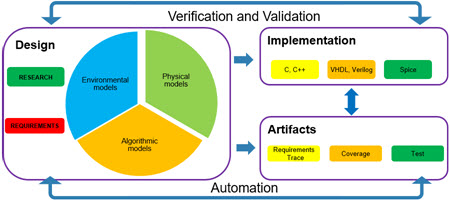
Charles Dicken’s novel, “A Tale of Two Cities“, was originally published in a serialized format in 31 installments over 6 months. Now the book that the average 10th grade high school student reads is the refactored final product. In that spirit over the coming year, I will be writing a series of blog posts that I will later collect into a book format. As a preview here is the high level outline of the material.

  • Motivating factors: What drives people to adopt Model-Based Design and how that driving force affects the order of adoption
  • Pillars of Model-Based Design: What are the key elements that define a Model-Based Design workflow.
  • Laying the foundation: What are the first steps in establishing a culture of Model Dased Design.
  • Validating your processes: How do you assess the success and failures of your establishment process?
  • Expanding the scope of Model-Based Design activities: How and when do you ramp up on the methods used as part of the Model-Based Design workflow.
  • Deploying the process across your organization: A discussion on methods for deploying the process across your organization and how to collect feedback from the members of the group.

BIO

Michael Burke is a consultant with The MathWorks and former coordinator for the MathWorks Automotive Advisory Board (MAAB). I currently focus on Model-Based Design Process Adoption and Establishment projects. Views expressed in this article do not represent the views of The MathWorks.