The Calendar Problem…

Today I’m coining the term “the calendar problem” to describe any system that has irregular rules,(1) which require complex logic to implement or check. My goal when creating any system is to bound any calendar problem logic to make validation as simple as possible.

Can’t be avoided; can be minimized

In systems, calendar problems will exist but they can be minimized through a 4 step process.

  1. Determine the core “default” rules: this is the behavior of the system unless an exception occurs.
  2. Determine the exceptions: what is the logic for when the core rules do not hold.
  3. Determine the exceptions to the exceptions: this is both when the exceptions do not hold and when there is a different result for the exception
  4. Look for back propagation: do the exceptions change any of the earlier results?

Calendar example

We will walk through the calendar to show how this can be applied

  • Core / Default
    • 365 days in a year
    • Jan, March, May, July, Aug, Oct, Dec : 31 days
    • Sept, April, June, Nov : 30 days
    • Feb 28 days
  • Modifications:
    • Every 4th year Feb has 29 days
    • The year has 366 days.
  • Modifications to modifications
    • If the year is divisible by 100 it is not a leap year
    • If the year is divisible by 400 it is a leap year
  • Back propagation
    • None

Humans and irregularities….

Irregularities come in when you have human interactions with your system; physics is always regular. The key is to look for situations where the person in the loop has conflicting needs or may not know there is an issue (so they act in ways that are not in alignment with what they want).

Footnote

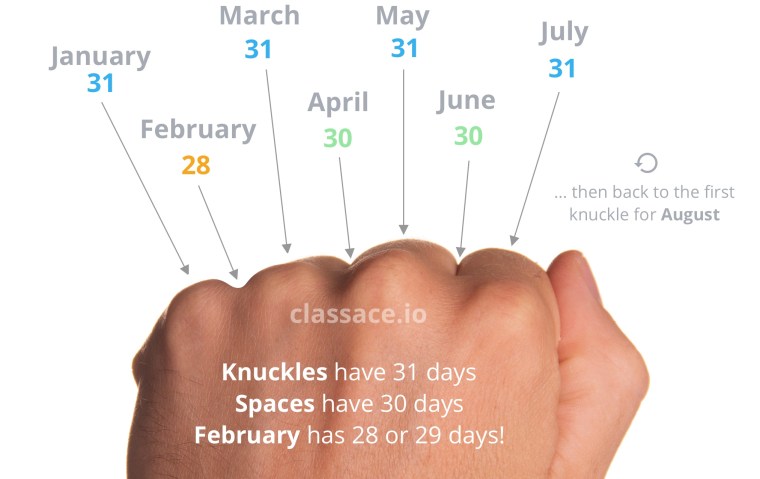
  1. The “knuckles / spaces” method for knowing which months have 28 / 29 / 30 or 31 days was something I just found today. What is interesting is that it shows the problem even as it offers help; the darn 28 / 29 February (not even getting into the 4, 100, 400 year issues here).

Doing your “bit”, or “don’t byte of more than you can chew”

In the US, the traditional “thank you” for a friend who helps you pack up your bits and move is payment through a bite of pizza.(1) When moving data in computer programs, we can pack our bits into bytes.(2)

In a recent post I wrote about minimizing the data used by your model. I want to expand on that concept by talking about data packing using masks. In this case it is a three way balance between minimizing data usage, efficiency of operations, and clarity of the data.(3)

Basic Bit

Masking a byte(4) is when a specific bit in the byte is associated with a Boolean value. For example:

#define VOLTERRORSTATUS 2^3
if (voltError) {
errorFlags = errorFlags || VOLTERRORSTATUS;}

In this example the variable error flags is “or” together to add the volt error onto the generic error flags message.(5) Later, the status of the error can be unmasked to take action.

if (errorFlag && VOLTERRORSTATUS) || (errorFlag && CURRENTERRORSTATUS) {
  /* Power problems!  Do something */
}

The total number of status flags that can be set using this method is dependent on the word size; a 32 bit integer could store 32 status flags. The drawback is that errorFlag, on it’s own, requires decoding before you know what the issue is.

Footnotes

  1. Sadly, these are the moments when you learn your friends’ horrible taste in pizza toppings.
  2. Despite the stereotypes, programmers do not get paid in pizza, though they may use their pay for pizza.
  3. The image on the right is a perfect example of this sort of balance; each point has some resilience and movement in any direction affects the others. As a secondary note, to the best of my knowledge no child ever liked this playground item.
  4. The image search for “mask” has very different returns from a year ago. Please help protect yourself and others and wear a mask when you go out.
  5. In this example “VOLTERRORSTATUS” is a #define variable. This is again, to save on memory.

What is Model-Based Design?

Many of my posts are prompted by questions from readers or issues that have arisen from my clients over the years. This one one comes from an engineering student, “What should I study if I want to go into Model-Based Design?”

One “post video” thought. Strictly speaking, the study of puns is not required to work in the field of Model-Based Design but study of the polymorphic nature of language can help you for the polymorphic behavior of models.

Some roses are red…(1)

“What’s in a name? That which we call a rose
By any other name would smell as sweet.”
Romeo and Juliet: Act 2 Scene 2

Names are labels we give to things to provide mental holding places for what a thing is; I am Michael, author of this blog and you, dear folks, are my readers.(2) Humans are flexible and we can assign different names to the same thing and still know it is a rose. Computer programs however….

Naming conventions

Many moons ago I wrote a post on naming conventions; (3) this is the first stage in the software “name game.” For software names have to be descriptive (with naming conventions) and unique.

Where things go wrong: Scope

Error, stop, fault, or startup: If you look into almost any set of code you will find these common variable names. If the variables are scoped to just the given module, things are okay, but often things “leak out.”

If you look at the interface variables, e.g. the bus (structures in C), enumerations, and all global data, you will see that enumerations, given the “state” nature, commonly reuse the same names.

ICD and Data Dictionaries

First, a note on the image. Since this is a blog on Names, the use of acronyms is especially important. When I write “ICD” I am thinking of Interface Control Documents; but it can also mean “Implantable Cardiovascular Device.” But enough side bars…

Our goal to have unique names (at the project scope) aided by two things; ICD and Data Dictionaries. The object here is to augment these base tools with integrity checking tools to validate full systems.

  • Tag the scope of data in the data dictionary: Enable scope detection for the data in the system.
  • Enforce naming rules: For both root and sub-data names.

Footnotes

  1. It has always bothered me that the poem goes “Roses are red, violets are blue“; properly speaking violets are by their very name the color violet.
  2. At some point in the future your role will change and you will have another name.
  3. The image to the right is exactly what a naming convention looks like; everyone comes together and picks names.

Diving into graphical models

Proponents of text based languages often point to the ease of developing / debugging their code; “I put a breakpoint on a line(1) and…” while at first blush it may seem easier to debug textual models today I am going to walk you through(2) how to debug graphical models.

What is debugging?

First let us come to an agreement on what it means to “debug” a model / code. A model has a “bug” when the model either

  • Fails to run:
    or
  • Runs producing incorrect results:
    it is not
  • Excessive memory use, slow execution(3)

Failure to run is easy to detect, incorrect results may be more difficult to detect if unit tests for regression do not exist.

Sometimes…

You get lucky and a simple differencing of your model against recent versions can determine where the error crept in.(4) To do this, you need to…

  • Review the blocks added to the model
  • Review block parameter changes
  • Review the changes to connections
  • Review changes to data

Breakpoints and probes

In textual debugging there is often enough “printf” statements to make you think you are in Project Gutenberg;(5) graphical models use probes and scopes to accomplish the same objective.

Breakpoints can be inserted into the model in any location; for advanced debugging techniques, conditional breakpoints can be used e.g., break when signal > MyVal

Sometimes when you debug you want to go in reverse(6)

Break it down

Finally, a powerful method available in Simulink is the ability to create test harnesses for subsystems, e.g. once you have isolated the issue to a given subsystem you can create a test harness that will run that section of the model independently, enabling a faster debugging experience

Final thoughts

Once you have gone through your debugging exercise…

  • Check any models that you have created to prevent regression to this bug
  • Note any incorrect block usage for future best practices

Footnotes

  1. Why yes, that is MATLAB code with simple breakpoints; it is the “text” portion of the Simulink / Stateflow / MATLAB triumvirate.
  2. After a month of video posts walking you through Model-Based Design this will be a short walk in the park.
  3. Many of the techniques for debugging a model can be used for these situations; however those are optimization problems, not function problems. The general best practice is to ensure full system compliance with requirements before starting to optimize your system.
  4. As a side bar, the phrase “low hanging fruit” is an interesting phrase. It covers the “things that are easy to get”. However, if you talk to people who climb into trees to pick fruit they will tell you that you grab the low hanging fruit last so you do not climb up the tree with extra weight. Like many things in life if your long term objectives should shape your short term actions.
  5. The Project Gutenberg brings public domain books to electronic format.
  6. Point-Break ==> reverse Break-Point

When every pico-second counts…

Often with embedded software speed(1) matters; however function always(2) matters. One common approach to improve execution speed is to take the training wheels off; that is, to remove boundary checking code.(3) Again, we have an often versus always situation; frequently that is okay but not always. So how do we make it always?

The baseline

Before we start trying to make things faster we need to perform a code profiling step (e.g. execute the code in both the standard and worst case scenarios).(4) Next, determine if you are trying to improve the standard or worst case operation. As you gather the data make sure to log both the performance (execution time) as well as the accuracy.

Training wheels off; Are we stable?

Note: this post is focusing on making sure the code is safe as you make it faster. Speed will be covered in other posts…

The first thing to check is if under normal operating conditions the system is stable (e.g., no overflows, no out of bounds errors, no integrator wind ups). For most systems this will be the case.(5) Next, it is time to check the corners.

There are three types of corner case tests that should be performed:

  1. Held: The system is driven to the corner case and the inputs are held there.
  2. In/Out: The system cycles in and out of a corner case.
  3. Sweep: Assuming there are multiple corners, the system sweeps between the different corners.

Wobbling?

When the system has instabilities the question becomes “Where do I insert controls while minimally impacting the system performance?” The key here is to perform a trace back to the first offending block.

Often(6) the block that causes the issue is not where the issue occurs (e.g., it is upstream of the issue). However, by modifying the upstream block you can have a lower impact on the system behavior.

Final notes

As I pointed out near the start of this blog, the first step is to collect timing data on the system “as-is.” Once the changes have been made and the new data is collected the system as a whole should be evaluated.

  • Is there a significant performance improvement?
  • Have the changes impacted the accuracy of the system?
  • Have the changes made the system harder to test?
  • Have the changes reduced the clarity of the system?

Once you have asked yourself these four questions you can then decide if the modifications should become the new version of the code.

Footnotes

  1. Just like in the movie, you don’t want your “Speed” to end up in a crash.
  2. The difference between often and always is how you prioritize your design. Take care of always first, then often will follow.
  3. Boundary checking code (e.g., looking for data type overflows, out of range pointers, or out of range input data).
  4. Optimization for worst case scenarios may not be the same as the standard operating conditions.
  5. In the subset of cases where the standard operating conditions cause errors, this is generally an indication of a poor design. I would strongly recommend stopping here and refactoring the base design first.
  6. I didn’t realize how often I write the word “often” until I called it out in this blog. But that is often the case, we don’t see things until we look at them.

Boot camp, tune up, refresh…

Over time the current best practices if unexamined run the risk of becoming “okay practices.” This is one of the reasons why the majority of MathWorks customers update their software roughly every 2.5 years.(1) While there are many metaphors for doing this the one I would choose for you will depend on where you are at…(2)

  • Bootcamp: Are you new to Model-Based Design? In this case the review is an intensive ‘hit all the major areas’ to bring you up to speed as quickly as possible.
  • Tune up: If you have been following a Model-Based Design process for a number of years then it is reviewing the major processes as well as focusing on any rough spots you may have detected.
  • Refresh: Like the tune up, you are experienced with Model-Based Design but you are starting a new project. This gives you a ‘clean slate’ to bring new processes into play.

Getting started

Before you get started, define a set of objectives (the “must have” and the “nice to have” improvements) as well as a time line(3) to complete the changes. From here, there are multiple paths forward.

  • Bring in outside resources to bootstrap the process.
  • Review the outstanding literature on current best practices.(4)
  • Consult with people who have joined your group from other companies.(5)
  • Review internal issue logs: find out what problems you been having and look for ways to address them.

Once you are done

Stop

Ok, really, once you are done

Before starting, the baseline objectives were set. Once those have been achieved, work should focus on the development of your product. Incremental improvements should be made over time but the focus should be on your core product. Rest assured when the next 2.5 year cycle comes around you can make your next round of improvements.

Wait this x 2.5

Footnotes

  1. There are two primary reasons for software updates; getting access to the latest version of tools (including new and improved features) and the chance to review existing workflows.
  2. One of the aspects of working as a consultant is that you are in a constant state of learning; every new customer brings new challenges and gives you another chance to examine how and what you recommend.
  3. Generally 3 months to complete the main work of a version migration is common; there will be some lingering tasks that involve the use of new technology which could push the total time out to 6 months.
  4. In reading this blog you are already doing this one!
  5. Note, as a general best practice when an outside person comes in this is a great chance to learn what other companies are doing (though take everything with a grain of salt, the other companies process may or may not have been good)

Ring! Ring! Event driven architectures(1)

Broadly speaking, control systems are broken down into event and continuous(2) time driven domains. Continuous systems are always taking in stimulus and putting out responses. While event driven systems respond when the event happens, the rest of the time they sit patiently quite unlike an 8 year old waiting for the gates of Disneyland to open.(3) A challenge arises when you start to mix the two types of systems together; how do you mix the chocolate of continuous time with the peanut butter of events to create a greater whole?(5)

Everything was going…
smoothly then there was a break

Events interrupt the smooth execution of continuous time systems. If the event preempts the execution of the continuous time system, you are halting the logic and calculations of the system. The return to the execution of the system can pose challenges. Let’s take a look at a few…

Something’s changed

The most common problem that occurs is that when the interrupt event happens there is an overall change in the system state and the data (pre and post interrupt) is no longer in correspondence.(6) This can result in incorrect calculations and / or commands.

Falling behind

In some instances the code associated with events can take a long time; as a result the periodic update of the continuous time system can “fall behind”; potentially missing multiple updates. In some instances important data is missed during that “time out.”

What to do?

Like many situations there is no “one-size fits all” solution; but there are general rules of thumb.

  • When something has changed:
    • Buffered or protected, data can be used to resume execution of the code with contiguous data.
    • A “return from event” handler can be used to determine if a system reset is required.
  • Falling behind:
    • For the “important” events a buffer can be constructed within the event driven code.

Testing the wind

Testing interrupted code is a sticky problem as by definition, when the interrupt happens it is an unknown. Use of random interrupt generators provide one method for testing the code but cannot provide full coverage. The recommendation for this blog is to create “worst case” interrupts; e.g. look at your model and ask “what is the worst place where the execution could be interrupted” and then do it there…

Worst place for an emergency

  • In the middle of nested if/else-if/else logic: The branch you are in may no longer be valid.
  • Performing differentiation: When your “dt” changes the diff can wiff(7)
  • Fault / error detection: If the code’s job is to detect errors then, well, this is one area where you may want to protect against interrupts.(8)

Footnotes

  1. Back at the dawn of time “Ring-Ring” was the sound that a phone made, a common “event driven” experience for many people.
  2. I went back and forth 2 or 3 times on the “continuous time” driven domains. The world we live in is continuous time, it keeps on slipping into the future. However most modern control algorithms are implemented on discreet time hardware and require a discreet time implementation.
  3. Like an 8 year old who can happily read a book while waiting for the gates(4) to open, the poor control algorithm just sits there waiting for the event to ring.
  4. That comment may or may not be autobiographical.
  5. I want to distinguish between states end events; technically the shift from Neutral to First gear in a car is an event; however, it operates within the set of data for the continuous controller. The types of events to be examined are often called “asynchronous” events.
  6. Back in the old days control algorithms would send long letters betwixt each other, now with email, texts and phones correspondents are less common
  7. Wiff: to miss, to have an unpleasant smell. Note: in general, integration operations are interrupt tolerant as they average values over time.
  8. Events and errors come in all levels of severity; setting the priority of the event and the given error handling code enables your OS to arbitrate between the two functions.

Let the knife to do the work…

When you read about how to cook you will often read the phrase “when cutting, let the knife do the work.” There is, however, a single word missing that changes everything; it should read let the sharp knife do the work.” One word, big difference.

The difference “a” word makes

The right tool, set up correctly

During this pandemic I have finally learned how to sharpen knives(1) by hand for when I cook something yummy for my wife and I; let’s talk about how to “sharpen your models.”(2)

Model configuration: every model in Simulink has a set of parameters that defines how it executes and how code is generated.(3) Fortunately there is a simple utility that allows you to configure your model parameters for your target behavior.

You must specify basic behavior such as time domain, step size, and the target hardware. But once that is done, the balance of your configuration is handled through the specifications of your objectives.

Data settings: from your parameters to your signals, configuring your data creates more efficient and more controlled generated code. Consider setting the data type, storage class, and possibly units.

Block selection: mixing model domains such as discrete and continuous time blocks can result in sub-optimal performance. If multiple domains are required, partition the domains off using atomic boundaries

Final thoughts

These are of course just a slice(4) of the type of configuration you should consider when setting up your model. Ideally there is a group that is responsible for the basic set up and maintenance of your working environment. This should extend to all of the tools in your development process. For more in depth information on these tools, take a look at the CI, and version control posts in this blog.

Footnotes

  1. Please note, this is not a product endorsement, it is a process endorsement. Also, we don’t have the “stropping block” but I always thought it looks more fun to have the corded strop.
  2. Note, this isn’t a perfect analogy as when you sharpen your configuration you are done for the project, unlike knives that need regular re-sharpening.
  3. When we were first developing this tool I asked the question: How many configuration parameters does a Simulink model have, 113, 178, 238, 312? The correct answer was all of the above depending on the baseline configuration settings. As you can see, this tool is very useful.
  4. Okay, I couldn’t resist one last knife reference for the post.

Reinvent the wheel, not the road…

For every cliché there a grain of truth and a seed of doubt.(1) First, why is this advice given and knowing that, when can you go against it? Now, let’s talk about what in this example is “the road.”

Where the rubber meets the road

When I am developing a product, I am developing that product. Any work done on tools and infrastructure beyond it takes away from my core objective. Following this analogy, the “road” is a common infrastructure developed and maintained by many; meaning that it will be a fit environment for running our tires along. We can focus on making the best tire, not worrying about potholes.

When the road doesn’t go where you need…

In 98%(2) of software development practices, the existing infrastructure will take you all the way to your goal.(3) The primary objective here should be to triage the tool chain. Ask what functionality…

  • … is sufficient: for these portions to use-as-is
  • … is near: see if existing work arounds and extensions exist
  • … is missing: determine if the functionality is truly needed and if so implement extensions to the existing tools

Popping wheelies

Joy and job satisfaction comes from those times when for good and just reasons you do re-invent the wheel. Today I’m here to say, let us do it one wheel at a time until the world turns around new.

Footnotes

  1. You could say that in doubting this you are going against the grain.
  2. In the 2% case, you should milk it for all it is worth.
  3. Mind you, I look at this photo and think “If I were the road runner I would paint something on here and run right through.”