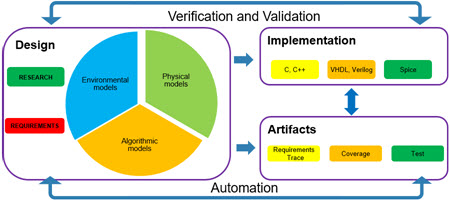
Creating documentation!

The title above is one of the few times you will see an exclamation point after the word “documentation.”  However, you should see it more often.  Document generation, as part of an overall Model-Based Design workflow, enables developers to improve their models more quickly and more efficiently.  For the most part, the required documentation can be automatical generated as part of the Model-Based Design workflow.

Types of documentation

Test and verification activity reports

There are two primary types of test and verification reports; instance and trending.

  • Instance report:  This report provides the information on the results of a given “instance” of one or more tests.
  • Trending report: Trending reports collect high-level statics such as the total number of tests passed/failed.

coveragePolyspace

Traceability reports

Traceability reports provide information on the coverage of the requirements.  These reports should show the following information

  • Percentage of requirements with links to models
  • Requirements with tests
  • Requirement test status

Unlike test and verification, traceability reports are always trending reports.

“Process” and “documentation” reports

The final type of report tracks the adherence to a defined process; this type of documentation is most frequently seen in safety critical systems.  A process document tracks how models move through the development process.  It is used to verify that all defined stages in the development cycle are completed.

processTracking.jpg

Final thoughts

Documentation serves a vital purpose in the development of software.  It both allows developers to understand the state of their product (tracking documents).  For companies following safety critical processes, both the traceability and process documents are artifacts that are used in support of the development cycle.

rtfm


Video Blog: Fault and control algorithms

In this post, back at the MathWorks offices, I talk about the decomposition between control and fault detection algorithms.

Requirements Management

It is well documented that bugsthe most cost effective point to find a bug is during the requirements definition phase.  Yet companies struggle to enforce good requirement writing guidelines and to maintain the requirements throughout the development lifecycle.  Why?

Requirements hierarchy

When reqHiwriting requirements the first thing to understand is that there is a hierarchy to requirements.  There are “top level” and “derived” requirements(1).  In some instances, there are test requirements.

  • Top-level requirements:  Can be characterized as “end user requirements.”  They describe the top-level interactions of the device.
  • Derived requirements: They decompose the top-level requirements into individually testable statements.  Depending on the complexity of the device there may be two layers of derived requirements.
  • Test requirements: Test level requirements are a special case of the derived requirements.  For some requirements tracking tools decomposing the derived requirements into individual test requirements for tracking is advantageous.

Guidelines for writing requirements

There are 5 fundamental guidelines for writing clear requirements.

  1. Write atomic requirements: Requirements should have only one requirement per item.
  2. Use action language:  Each requirement must contain a subject (user/system) and a predicate (intended result, action or condition).
  3. Describe what the system will do: Avoid describing how the system will do something. Only discuss what the system will do.
  4. Use consistent language: The requirement documents should use consistent language.  A definition document should be written and followed.
  5. Write testable requirements:  The requirements should be written in a testable fashion.

A further best practice is to perform design reviews on requirements early on in the writing process.  This ensures that people are following these guidelines.

Maintaining requirements

There are two ways in which requirements change.  First changes to the top level requirements push changes down to the derived requirements(2).  In this case affected derived requirements should be updated.  This is helped if there is a mapping document between the top-level and derived requirements.

IT-Maintenance

The second way in which requirements change is due to limitations or errors found during the design and analysis phase.  These are found when the tests, based on the requirements, fail.  At this point in time, it is up to the test engineer and developer to determine if the error is in the implementation or the requirement. If the error is in the requirement then the requirement should be updated.  Note, using bug tracking software to link tests back to the status of requirements will simplify this process.

Establish requirements traceability

Most Model-Based Design software allows you to establish links between the models and the requirements.  Using these links can help automate and enforce good requirements maintenance habits.  A Simulink example can be found through this link.

farm to fork_3

Final thoughts

This blog post serves as an introduction to requirements management. Additional thoughts and resources will be laid out in future posts.

Footnotes

(1) The terms “top level” and derived requirements vary from industry to industry; however, the core concept is consistent across industries.
(2) Ideally, any changes in the top level requirements take place early in the design and analysis phase to reduce impacts on cost and time.

The house that Model-Based Design Builds

For the past year, I have followed a video blog called “primitive technology” in it the author takes you through, step-by-step, a process for first making tools, and then from those tools building structures. It is honestly fascinating; while watching him I see the antecedents of the tools that I have used.

However, it is counter to how I want to live my professional life as I wrote earlier about reuse versus building from scratch. Today I will expand on my video blog from Oct 20th and talk about tool selection and their application.

When all you have is a hammer, everything looks like a nail

Working in the embedded design world the “house” that I build is most commonly the control algorithms which run everything from refrigerators to satellites. Within that framework, as a consultant for The MathWorks, I am frequently asked: “what should be code by hand and what should we do following an Model-Based Design process.” In answering this I fall back to a new saying, “pick the tool based on the fit in your hand and the fit for the task.”

Fit in the hand: The first time I picked up a nail gun it was heavy, awkward and I was prone to badly placing nails. However by the end of the day, having completed framing of three rooms, it fit in my hand as comfortably as the best framing hammer.

Fit for the task: As much as I loved my nail gun, the next day I was doing border trim and a new tool was required; I grabbed a trim hammer.

How to decide with Model-Based Design: The problem with analogies is nothing ever maps perfectly one-to-one. A model based development process is more than just a power tool that let’s you perform the same task more quickly. Rather it is a set of power tools that let you perform the same task and new tasks more easily and more dependably.

My breakdown falls along the line of algorithm verses the external interfaces. I would reference last week’s blog post.

Inside Model-Based Design: Control algorithms, interface to low level device drivers, function scheduling

Outside Model-Based Design: Low level hardware device drivers, operating systems

Assorted thoughts and comments:

1.) The image of the tool box with every tool in it’s place and highly organized requires discipline in your software processes. Remember it is the processes that keep the tools from looking like this…

2.) My experience of home building is limited to some time while at university volunteering for habit for humanity. Spend some time with them if you get a chance.

3.) The banner image of the nail gun also includes a level in the handle; I like to think of this much like the MathWorks products, e.g. even as we drive the nail we give you additional information.

4.) Sorry there was no juggling in the video.

Video: Time and project planing

In this video, I cover methods for reviewing and projecting timelines for projects.

Behind the M.A.A.B. Style Guide: Lessons in working with brilliant people

[This reprint of one of my linked in blog posts while I am on vacation]

For 8 years, between 2005 and 2013, I had the privilege of hosting the MathWorks Automotive Advisory Board (MAAB). In that role I helped to shape of version 2.0, 3.0 and 3.1 of the document. Over the course of those 8 years I enjoyed many conversations with engineers from GM, Ford, John Deere, Toyota, CAT to name but a few. Working with them helped to sharpen my listening and understanding skills; a benefit that I carry forward in all of my work.

Who were those masked people?

The average member of the MAAB Style Guide working group had a PhD, 20+ years of industry experience, and were the Model-Based Design subject matter expert within their company. Most importantly of all they were passionate about developing the field of Model-Based Design (a majority of the board members donated their time outside of their normal work duties.)

Bright, passionate used to being listened to…

When I took over the position the former host likened it to “herding cats.” So how to get them to work together?

1.) Understand your own bias: It is an extremely rare to take part in a conversation where you have no opinion. Be aware of your own thoughts and how they influence what you are hearing. Use that knowledge to be open to new understandings

2.) Actively listen to them: The first step in reaching consensus is understanding all points under discussion. As the “outside” person it is easier to hear all points of view

3.) Find the common ground: In most cases two (or more) parties will share common ground in their base line objectives.

Define the common ground referencing what you learned through active listening, and reach a consensus from the group for this baseline information.

4.) Explore the reasons behind the differences:

In my experience 80% of the time the differences in approach stemmed from a real world problem that the other person had yet to encounter.(1) Once the rationale behind the difference was understood then an informed response can be made

5.) Accept compromise: For the 20% of cases where there is no agreed upon position can be found (2) there is an appeal to necessity. Most experienced engineers understand project deadlines and if they have been listened to (3) are willing to accept a compromise on the work product.

We are all those masked people

In 20+ years of direct customer interactions, both technical and business focused, I have come to realize that everyone can be a ‘brilliant person.’ What you get out of an conversation is directly proportional to what you put into conversation.

Notes:

1.) The objective of the MAAB Style Guidelines are to provided recommendations to ensure error free models with a consistent style to aid in understanding.

2.) With the MAAB Style Guidelines there were cases where consensus could not be reach and both parties had valid points. This is where you see the “follow either option 1 or option 2” in the guidelines.

3.) Please note, I write, “have been listened to” not “feel like they have been listened to”. People can tell if you have actively listened and understood them.

What’s on your white board…

[This blog post is a “reprint” of one of my Linked in posts while I am on vacation]

In meetings or in your office the humble whiteboard(0) is a rapid prototyping environment through which we communicate ideas. Chances are if I have ever spoken with you in a room with a whiteboard, I have drawn this(1) representation of Model-Based Design system architecture.

As I drew I would have spoken about the following concepts

1.) The Green: model hierarchy:

a.) To support team based and unit testing development workflows create your models in a hierarchical fashion. Use model reference to encapsulate each level of the model.

b.) The “final” level of the hierarchy should be a model that is owned by a single developer and should be of a size and complexity that someone besides the developer (2) can understand it with an hour review.

2.) The Red: separation of hardware

a.) Calls to hardware functionality should be separated from the algorithmic code

b.) For simulation based testing create “I/O” which enables the

i.) Validate of interfaces

ii.) Stimulate the algorithmic model with “safe” values

c.)Within the hardware I/O modules convert the date from digital (counts, volts,…) to engineering units.

3.) The Blue: version control / software practices…

a.) Place the objects into version control (e.g. model, data, test files, reports…)

b.) Identify objects that can be reused across projects

c.) Requirement documents, test results, and utility functions should exist within the repository (3)

4.) The Black: Data and tests

a.) Create a data dictionary that exists separate from the models

i.) The data dictionary includes model and test data (test inputs and results)

ii.) The data dictionary includes model and build configuration information

b.) Create a generic test infrastructure for

i.) Running the tests

ii.) Creating test reports

iii.) Performing common test validation tasks

c.) Reports: use the testing infrastructure to create reports for status tracking and internal review

Cleaning the board

I would be interested in seeing what is on your white board. To start things off I have captured a few of my co-workers boards….

Information dense

Delta estimates

Project specific

Footnotes:

0.) I still prefer chalk boards to white boards(4) even though I see the advantages of white boards; I just like the tactile feel.

1.)   Honestly if you have seen me draw this in person it was not this neat and clean as the discussion would have included redrawn lines to incorporate the bits of your own process.

2.)   Always be ready for the developer of an algorithm to move on; 95% of the time I want clarity over cleverness in design.

3.)   The requirements documents don’t show up in this white board picture, this is to represent the reality of many engineering environments

4.) These footnotes are using C zero-based indexing.

Video Blog: ROI for MBD

For this video blog, I cover how to speak about ROI for Model-Based Design projects.

Model-Based Design F.A.Q.

In a recent meeting, I was asked: “What are the common questions that people ask about Model-Based Design?”  With some reflection, I came up with these four questions and answers.

What are the benefits of adopting Model-Based Design?

The financial benefits?

This question, which generally comes from management is straight forward.  Do we see a financial benefit (ROI) from adopting?  If so how long before we see these benefits?  The answer, of course, depends on the starting point of the group, however, the following link provides a good overview on estimating ROI for the adoption process.  The timeline for realizing benefits is generally 6 months to start seeing the ROI.  Full adoption and full realization occur between 2 ~ 4 years after the start of the project.

The process benefits?

This is, more often than not, processa defensive question. There is, understandably, a reluctance to change existing processes if they are working.  Because of this, the answer addresses the common problem that existing traditional hand coding environments, errors introduced at the handoffs points between researchers to developers to test engineers to system engineers to…  As discussed in earlier blog posts, one of the fundamental aspects of Model-Based Design is the use of a model as the single development environment throughout the full development process.
I have a technical question…

How do I reuse all these existing…

For most companies, there is areuse significant investment in existing infrastructure.  Therefore, it is a high priority task to figure out how existing software objects.  First, as talked about in these blogs much of the existing software development infrastructure can and should be reused with some modification and extensions.

Second, there is the perennial engineering advice: “If it ain’t broke don’t fix it.”  One of the earliest tasks  in adopting Model-Based Design is identifying the parts of the existing software infrastructure that is

  1. Well partitioned and encapsulated
  2. Reflects and maps to the requirements
  3. Has good test coverage

Once those have been identified, leave them alone.  For other software objects, they can either be recreated or they can be incorporated into the Model-Based Design environment depending on their level of “completeness.”

How can it ever be as good as what Sally does?

Sally, or Bob, depending on the day I am speaking, is the local guru.  They are the person who produces the best code, tests, or systemsavant architecture following a traditional design practice.

The short answer that I give is this: no automation process, for a single task, can match a highly experienced developer.  However, there is a limit to how many Sallys/Bobs that exist in an organization and the automation software produces code that is on par with an average developer for single tasks.  Further, due to the optimizations that are possible for an automated methodology, it can find optimizations that humans have difficulty in finding.

There is another aspect to this; has anyone asked Bob and Sally if they would like to be working on higher level tasks?  Frequently these people could accomplish even more if they were not down in the “guts”


Assessing your current state

During the exploration phase of adoption, the adoption team should have become familiar with the fundamentals of Model-Based Design e.g. model architecture, data dictionaries, testing, formal methods, report generation and so on. In that this blog is focused on groups adopting MBD it is a fair assumption that the current state is “introductory” (1) however the following sections can be used to identify where additional support is needed.(2)

Architecture

The following tasks should be understood…

shellmodelint

  • Encapsulation of models:  How to define each model in a format with defined interfaces and data.
  • Integration of models: How to integrate individual models into a larger integration model
  • Integration of existing code artifacts: How to integrate artifacts from the models into existing code artifacts and/or integrate code artifacts into the models

Data management

The following tasks should be understood…

boxbarimage5.jpg

  • Creation of data artifacts for use in the model: How to create data that the model can reference
  • Management of data artifacts: How to store and reference data artifacts in a scalable way.
  • Harmonizing data between model and existing code artifacts: How to reuse data between models and existing code artifacts

Testing

The following tasks should be understood…
exampleHarness

  • Creation of test harnesses: How to create a test harness that will exercise the model in a “stand alone” method.
  • Creation of data: How to create the data used by the test harness both for input and output evaluation.
  • Creation of test evaluation methods: Creation of methods for evaluating the outputs from tests

Supporting tools

The following tasks should be understood…

supportingTools

  • Basic use of version control: The users should understand which files need to be placed under version control.

Final thoughts

The obvious question arises “how do I move from “introductory” to “ready?”  There are three primary methods

  1. Training: There are multiple training courses (industry) out there allowing you to learn about Model-Based Design (university).
  2. Papers: Both academic and industry papers exist to help you learn about MBD.
  3. Outside help:  Outside help can come from either hiring people with MBD experience or hiring outside consultants.
  4. All of the above…

Footnotes

(1) Having an introductory level of knowledge of Model-Based Design methodologies is not the same thing as an introductory level of knowledge of software development.  Most groups that adopt MBD have a strong software development background.
(2) Most of the “Why is my state so [XXX]” I understand.  However, I don’t know why Pennsilvina and Connecticut got “haunted” as their “Why.”